
Logo bulkpriceeditors

How to Change Prices in Bulk on Shopify (2026 Guide)

How to change prices in bulk on Shopify: raise or lower by % or $, set exact prices, by collection or tag, per market, round to .99, preview and undo.

Updated November 27, 2026 · by Ivan Ivanov

Some links on this page are affiliate links. Facts are checked against each app’s own listing and docs.

Quick answer

To change prices in bulk on Shopify, edit the Price column in Shopify’s bulk editor or in a product CSV. Shopify’s help pages mention no percent changes, rounding, scheduling or undo, so for “+8% on everything” you either use spreadsheet formulas or a bulk price app.

  • Bulk editor: type each price, or copy one down with the fill handle.
  • CSV: calculate in a spreadsheet, import with overwrite. Blank cells overwrite values with blanks.
  • Apps add percent or amount rules, rounding, a preview and an undo.
  • Speed is set by Shopify’s API: about 400 products/min on Shopify Basic or Grow, 1,000 on Advanced, 5,000 on Plus (Platmart FAQ).

Top pick for price-only jobs: Platmart Bulk Price Editor (percent or amount rules, rounding, preview, rollback any time while installed; free plan, paid from $14.99/mo as of Nov 2026).

Try it free →

If you also edit tags, SEO or metafields: Hextom or Ablestar cover prices plus most other product fields.

The built-in Shopify way, in short

Shopify lets you change many prices at once in its bulk editor grid or with a product CSV, but you type or calculate every new price yourself.

Bulk editor.

  1. In your Shopify admin, go to Products, filter the list and select the products.
  2. Open the Shopify bulk editor and show Price (and Compare-at price) from the Columns menu.
  3. Type the new prices, or drag the fill handle to copy one price down, then click Save.

Product CSV.

  1. Export the products.
  2. In a spreadsheet, calculate new values in the Price column (for example, current price × 1.08).
  3. Import with the overwrite option. Omitted columns keep their current values.

Keep the original export: with built-in tools it’s your only way back. Sources: Shopify bulk editing, CSV import.

The faster way: a bulk price app

A bulk price app applies one rule, such as “+10% on this collection”, to every selected product, logs the old values and lets you undo the run. The steps are similar in most apps:

  1. Create a new price change (apps call it a task, job or edit).
  2. Choose the change: increase or decrease by percent or amount, or set a new price.
  3. Add rounding, such as endings in .99.
  4. Pick the products: whole store, collections, tags or single variants. Review exclusions.
  5. Preview the new prices, then run now or schedule.
  6. Check the change log. Undo if something looks wrong.

In Platmart Bulk Price Editor, for example, a store-wide 10% increase is a task, per its docs: Create task > keep Product prices > Increase price, by percent, 10 > optional rounding such as Set price ending .99 > Apply to Whole store > Preview changes > Start task. Task Details then lists every variant’s old and new values, and Rollback undoes the run.
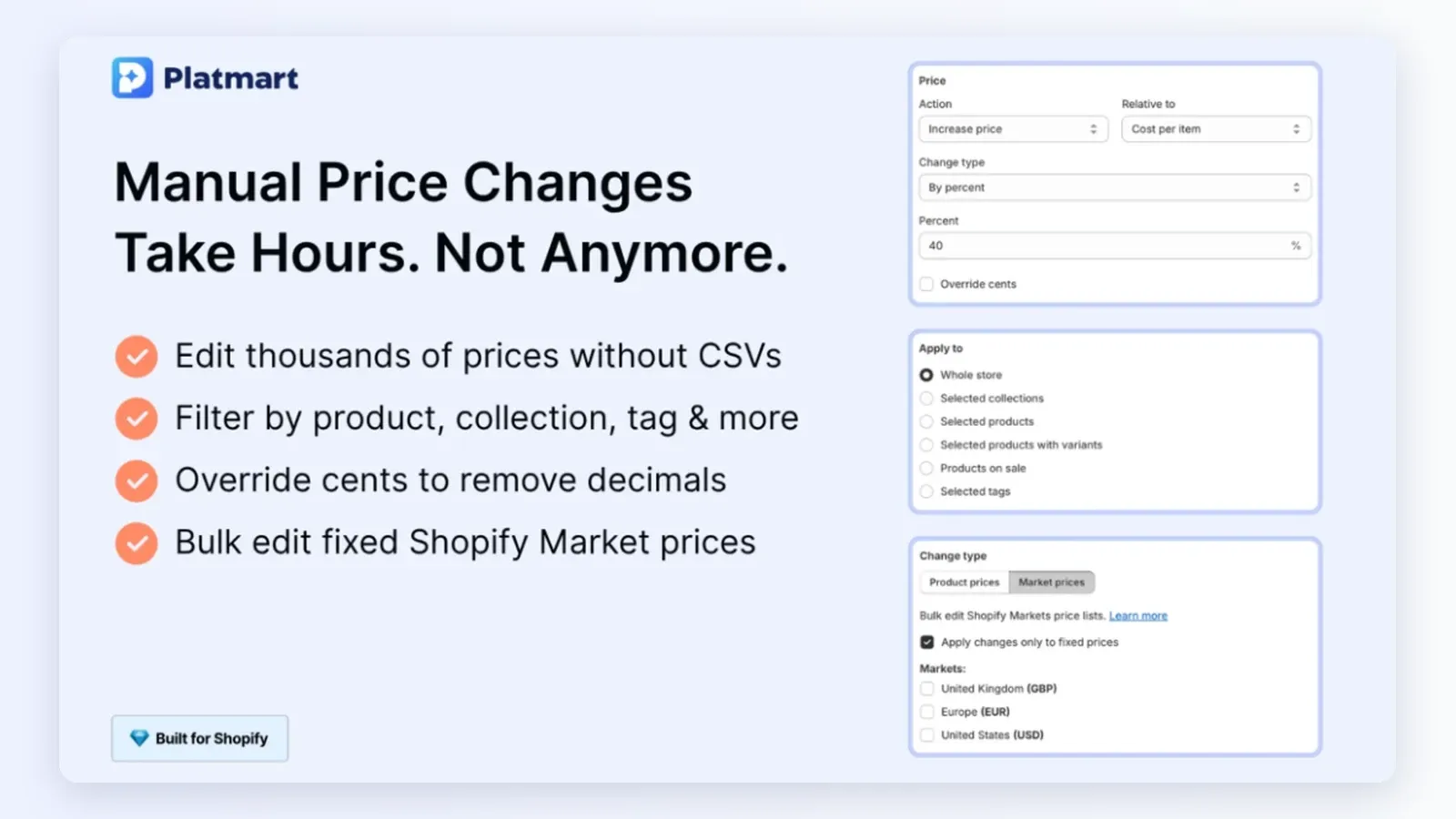
V3 platmart ui task markets

Platmart Bulk Price Editor task form, from its Shopify App Store gallery, Nov 2026

Other apps do the same job with different limits. SA Bulk Product Editor, Ablestar and Hextom list percent changes, rounding and an undo; Matrixify does the math in a spreadsheet instead (see Matrixify alternatives). Plans side by side are on the Shopify bulk price editor pricing page.

Raise or lower prices by % or a fixed amount, or set an exact price

Most bulk price apps cover the four common changes: increase, decrease, set a new price and set a price from cost.

  • +8% on everything (a supplier rise): increase by percent, 8, whole store.
  • -$5 on a collection (clearance): decrease by amount, 5, that collection.
  • $19.99 on a tag (one flat price): set new price, 19.99, that tag.
  • Markup from cost: an increase relative to cost per item. In Platmart this is on Advanced and up, and products without a cost are skipped. SA, Ablestar and NA also list cost-based pricing.

For timed discounts that should revert, use a sale, not a permanent change; see the Shopify sale guide. If compare-at prices need updating in the same edit, see Shopify compare at price.

Change prices by collection, tag or vendor

Most apps select by collection and tag; vendor and product type filters vary.

Ablestar, SA, NA and Bulk Price Editor Pro list vendor or product type filters, and Hextom matches products by conditions. Platmart’s Apply to offers Whole store, Selected collections, Selected products, Selected products with variants, Selected tags and Products on sale; for a vendor, its docs suggest a Shopify automated collection with a vendor condition. Its pickers take up to 100 collections and 100 products per task.

Check which product statuses an app changes. In Platmart, only active products change by default; Settings > “Apply price changes to” > “Active and draft products” adds drafts, and archived products are always excluded.

Raise prices for one market (tariffs)

To raise prices in one market only, change that market’s prices, not your main prices.

On Shopify’s side, markets without fixed prices follow your main price, so a store-wide change reaches them. Fixed market prices need their own edit: Shopify’s route is the “Price / [Market]” CSV column, which exports only for markets with exactly one active catalog not shared with another market. Ablestar, Hextom, NA, SA and Bulk Price Editor Pro (Super plan) list Markets prices. In Platmart, a task under Market prices does it (Advanced and up, one currency per task; tax-inclusive stores edit one market at a time). The full picture is in Shopify markets pricing.

Round prices to .99

Rounding turns calculated prices like $28.89 into shelf prices like $28.99, and an app can do it in the same run as the price change.

Ablestar rounds to .95/.99 or the nearest multiple, Hextom rounds to .99, and SA lists rounding rules. Platmart’s modes are “No rounding”, “Round to whole number”, “Override cents” (00–99) and “Set price ending” (a pattern like *.99, added May 17, 2026). So a 7% increase on $27.00 gives $28.89, and “Override cents” at 99 makes it $28.99. With a CSV, use a spreadsheet formula. Details: Shopify round prices.

Preview and rollback

Preview before, undo after: that pair makes a big price change safe.

SA and Ablestar list a preview of old against new values. Platmart’s Preview changes (added Nov 13, 2026) lists current against new prices on new tasks and sales and stays valid for 30 minutes; it isn’t available when editing an existing task.

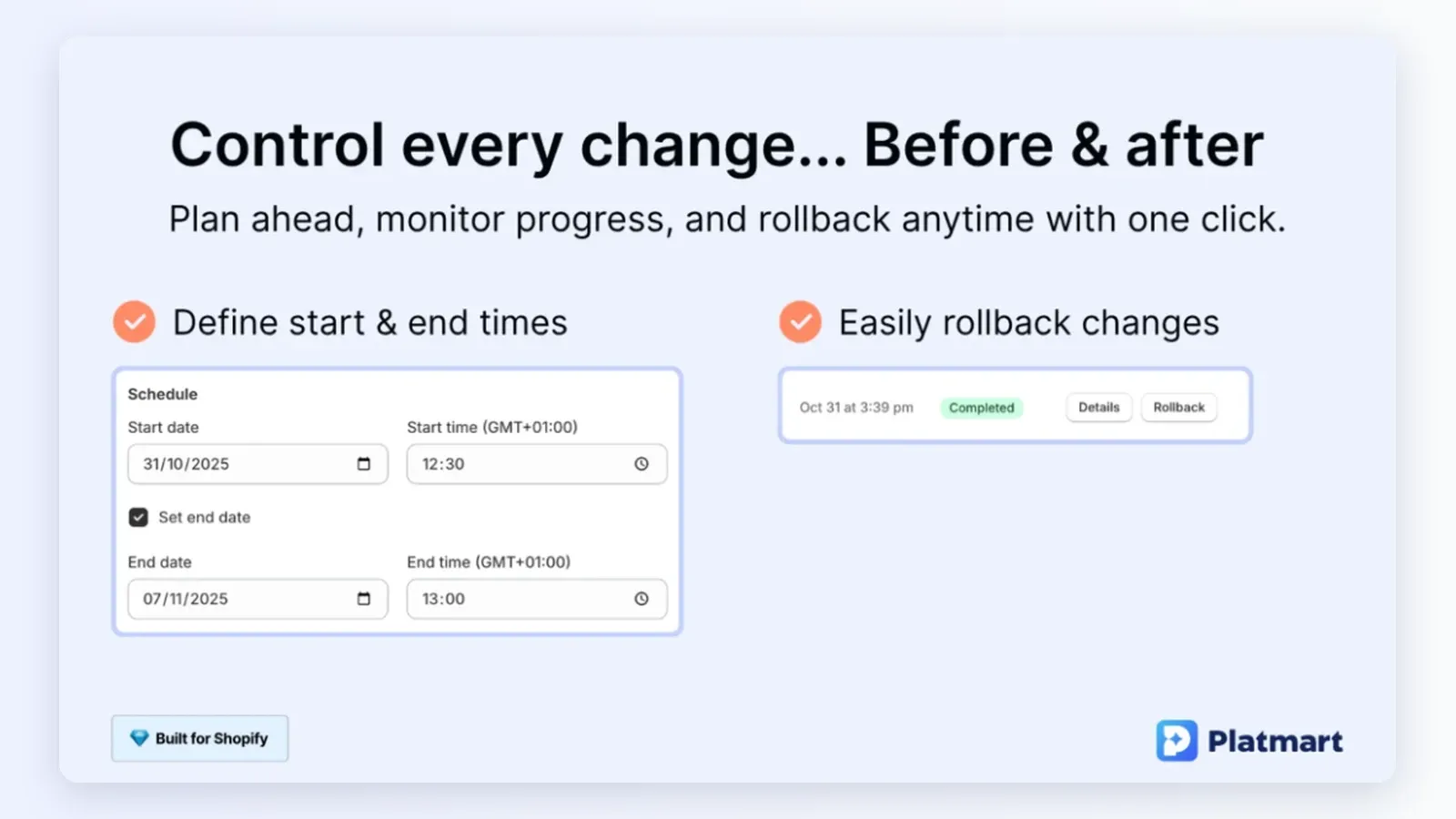
For undo, Hextom keeps backups for 30–180 days by plan, SA and Ablestar keep 30–180 and 60–180 days of history, and Platmart’s Rollback works on any completed task while the app is installed, restoring price, compare-at and cost per item. Platmart’s rollback also cancels newer changes to the same products. More in undo bulk price change Shopify.

V3 platmart ui schedule rollback

Platmart Bulk Price Editor schedule and rollback, from its Shopify App Store gallery, Nov 2026

How long a Shopify bulk price update takes

Speed depends mostly on your Shopify plan, because Shopify’s API sets the pace.

Platmart’s FAQ gives about 400 products per minute on Shopify Basic or Grow, about 1,000 on Shopify Advanced and about 5,000 on Shopify Plus, with cost or margin changes taking about twice as long. By that rate, 10,000 products on Shopify Basic take roughly 25 minutes. SA’s docs say tasks run in batches of 400 products and most finish within a few minutes; Hextom says a task runs “within a few minutes”. Shopify’s own bulk editor page gives no item limit and only says larger edits take longer.

Common mistakes and fixes

  • Wrong percent on thousands of products. Preview first; keep an undo (app rollback or your CSV export).
  • Ugly prices like $28.89. Add rounding to the same run.
  • Draft products unchanged. Check which statuses the tool edits.
  • Prices raised above an old compare-at. The strikethrough disappears; update compare-at in the same edit.
  • Another app resets your prices. Find the app that syncs prices. Platmart’s Premium plan has hourly auto re-apply.
  • Editing prices by hand during a sale. Apps that restore prices at a sale’s end overwrite those edits. Change prices after the sale.
  • Using a permanent change for a temporary discount. Use a sale that restores prices; per-variant sale prices are in Shopify bulk edit variants.

Tools that can do this

AppGood at for this jobEntry price (as of Nov 2026)Link
Ablestar Bulk Product EditorPrices plus nearly every product field; preview, one-click undo, roundingStarter free (10 products/edit); Basic $30/moApp Store
Hextom: Bulk Product EditAll product fields; backups and revert; .99 roundingDemo free (10 products/task); Basic $9.99/moApp Store
MatrixifySpreadsheet import/export for very large catalogsDemo free (10 items/file); Basic $20 per 30 daysApp Store
Platmart Bulk Price EditorTop pick for price-only jobs: percent/amount rules, rounding, preview, rollback, MarketsFree (1 task + 2 sales/mo, 100 products); Basic $14.99/moTry free
SA Bulk Product Editor & PricePrice plus 50+ fields; preview, undo, roundingFree (100 products/task); Basic $9.90/moApp Store

What this means: for prices alone, a price-focused app is simpler; if you also edit other fields, an all-field editor saves a second tool. The two all-field editors are compared in Hextom vs Ablestar, and every app in the Shopify bulk price editor comparison.

FAQ

  • How do I change prices in bulk on Shopify?

    Select products in your Shopify admin and edit the Price column in the bulk editor, or change prices in a product CSV and import with overwrite. For percent changes, rounding and undo, a bulk price app is faster: it applies one rule to a collection, tag or the whole store.

  • How do I change prices on Shopify for one product?

    Open the product in your Shopify admin, type the new price in the pricing section and save. Products with variants have a price per variant. If you’re lowering the price for a sale, put the old price in Compare-at price so it shows crossed out.

  • Can I raise all prices by a percentage?

    Not with Shopify’s bulk editor alone, since its help page mentions no percent changes. You can calculate new prices in a CSV with a spreadsheet formula and import it. Most bulk price apps have an increase-by-percent action you apply to the whole store.

  • Can I lower prices by a fixed dollar amount?

    Yes. Bulk price apps offer a decrease-by-amount action: enter the dollar figure and pick the products. With Shopify’s own tools, subtract the amount in a spreadsheet and import the CSV. If it’s a sale, put the old price in compare-at so it shows crossed out.

  • Can I set the same price on many products?

    Yes. In Shopify’s bulk editor, type the price once, drag the fill handle down the column and save. For thousands of products, an app’s “set new price” action applied to a tag or collection saves selecting them by hand.

  • How do I change prices for one collection, tag or vendor?

    In Shopify’s bulk editor, filter the product list first. In an app, pick the collection or tag as the target. If an app has no vendor filter, create a Shopify automated collection with a vendor condition and apply the change to it.

  • How do I raise prices for only one market?

    Edit that market’s prices, not your main prices. Markets without fixed prices follow your main price, so a store-wide change raises them everywhere. Apps with Markets support, such as Platmart (Advanced and up), NA, SA, Hextom and Ablestar, can change one market’s prices in bulk.

  • Can I round prices to .99?

    Yes. With a CSV, use a spreadsheet formula such as =INT(A2)+0.99 before importing. Many apps round in the same run as the price change: Ablestar to .95/.99, Hextom to .99, and SA with rounding rules.

  • Can I preview a bulk price update?

    Shopify’s bulk editor shows the values you type but has no preview of calculated changes. Several apps preview old against new values before anything runs, including SA and Ablestar. Matrixify has a Dry Run option to check an import file first.

  • How do I undo a bulk price change?

    With Shopify’s built-in tools, re-import your original CSV export; the bulk editor has no undo. Apps keep backups: Hextom 30–180 days by plan, Ablestar 60–180 days, and Platmart any completed task while installed (try it free).

  • How long does a bulk price update take?

    It depends on your Shopify plan, because Shopify’s API sets the pace. Platmart’s FAQ gives about 400 products per minute on Basic or Grow, 1,000 on Shopify Advanced and 5,000 on Plus. A bigger app plan doesn’t make it faster.

  • Can I schedule a price update for later?

    Not with Shopify’s built-in tools. Apps that schedule lasting changes include Hextom (Professional, $19.99/mo), SA (Basic, $9.90/mo), Ablestar (Basic, $30/mo) and Bulk Price Editor Pro (from $20/yr), as of Nov 2026. Times usually follow your store timezone.

  • Can I update prices based on cost or margin?

    Yes, if your products have a cost per item. SA sets price as a percent of cost or cost plus a percent, NA prices by unit cost or margin, and Ablestar covers prices from cost. Products without a cost can’t be priced this way.

  • Will a bulk price change affect compare-at prices?

    Only if you change them. Compare-at stays as it is unless you edit it in the same bulk editor session, CSV or app run. If you raise prices above an old compare-at, the strikethrough disappears from your storefront, so update or clear compare-at in the same edit.

  • Does a bulk price change affect draft products?

    It depends on the tool. In Shopify’s bulk editor, whatever you select gets edited. Apps often select by product status, and some change only active products unless you switch a setting, so check before a large run.

Top pick for price-only jobs: Platmart Bulk Price Editor · free planTry Free

Ask AI about this page

II

Ivan Ivanov

Shopify pricing writer

I compare Shopify pricing apps using their own App Store listings, docs and changelogs. Every price and limit on this site carries the date it was checked.

Popup manager v2

Changing thousands of Shopify prices?

Our top pick for price-only jobs is Platmart Bulk Price Editor: scheduled sales that restore prices, compare-at strikethrough and rollback.

Free plan · paid from $14.99/mo (Nov 2026).

See all apps compared