
Logo bulkpriceeditors

Shopify Markets Pricing: How to Change Prices per Market (2026)

Shopify Markets pricing: fixed vs converted prices, catalogs and CSV, and how to change prices or run a sale for one country without touching the rest.

Updated November 27, 2026 · by Ivan Ivanov

Some links on this page are affiliate links. Facts are checked against each app’s own listing and docs.

Quick answer

Shopify Markets prices come in two kinds: converted prices follow your main price, and fixed prices are set per product and override it. To change many fixed prices at once, or run a sale in one country only, use a CSV import or a bulk price app with Markets support.

  • Converted prices change whenever your main price changes.
  • Fixed market prices override admin prices and compare-at prices.
  • Product CSV market columns export only for markets with exactly one unshared catalog.
  • Apps listing Markets prices: Ablestar, Bulk Price Editor Pro (Super), Hextom, NA, Platmart (Advanced+), SA.

Top pick for market price changes and market sales: Platmart Bulk Price Editor (Market prices in lasting tasks and timed sales that restore, “Apply changes only to fixed prices”, “Reset fixed prices”; free plan, Markets from $24.99/mo as of Nov 2026).

Try it free →

If you keep market prices in a spreadsheet with other product data: Matrixify’s per-catalog price columns fit better.

Fixed vs converted market prices

Every market price is either converted from your main price or fixed by you, and that decides what happens when you edit prices.

Main price: $50.00
   │
   ├── Market A (no fixed prices) ──> converted: follows $50.00
   │                                  (exchange rate + rounding + any % adjustment)
   │
   └── Market B (fixed prices)    ──> its own number, e.g. 45.00
                                      (overrides the main price and compare-at)

Raise main price to $55.00:
   Market A moves with it.   Market B stays at 45.00.
Converted priceFixed price
Where it comes fromMain price, converted at the exchange rate (automatic or manual)Set per product or variant in the market's catalog
Changes when main price changesYesNo
Shopify's built-in controlsRounding rules, catalog % adjustmentAdmin edit per product, catalog CSV import
Compare-atFollows the adjustment by defaultSet separately once "Include compare-at price" is off
In a bulk price appChanges with a normal (main price) editNeeds the app's market price mode

What this means: if a market has no fixed prices, a normal store-wide price change already reaches it. Fixed prices are the ones that need a separate, market-level edit.

Shopify’s own options for market prices

Shopify gives you four built-in levers, according to its international pricing and catalogs help pages (checked Nov 27, 2026).

  1. Currency conversion. Automatic at the current exchange rate, or manual exchange rates.
  2. Rounding. Rounding rules tidy converted prices per market.
  3. Catalog price adjustment. A catalog is a set of products with optional custom pricing, assigned to a market. One percentage in Price adjustment raises or lowers all its prices, and compare-at too by default.
  4. Fixed prices. A price for an individual product in the catalog, overriding the adjustment.

For bulk work, the catalog CSV (Import > Adjust prices) takes Catalog Title, SKU, Handle, Fixed Price, Compare At and Published columns, with a preview before you confirm. Its export only includes fixed-price products. The product CSV also has “Price / [Market]” and “Compare At Price / [Market]” columns, but only for markets with exactly one active catalog not shared with another market.

What the help pages don’t mention: a percent change for fixed prices, a scheduled start or end, or an undo besides re-importing your old file.

The faster way: a bulk price app

A bulk price app with a market mode changes one market’s prices by rule, by percent or amount, across any number of products. The generic steps:

  1. Create a price change and switch it to market prices.
  2. Pick the market (apps may limit you to one currency per run).
  3. Set the change, for example +5%, and rounding.
  4. Pick the products, preview, then run now or schedule.

In Platmart Bulk Price Editor, for example, per its markets docs: Create task > Change type: Market prices > pick the market (more are allowed if they share one currency) > Increase price by 5% with Set price ending .99 > optionally tick Apply changes only to fixed prices to touch only variants that already have fixed prices > Apply to > Preview changes > Start task or Schedule for later. “Reset fixed prices” sends a market back to following the main price, and markets that share a catalog are edited through one market in the group (Jun 5, 2026).
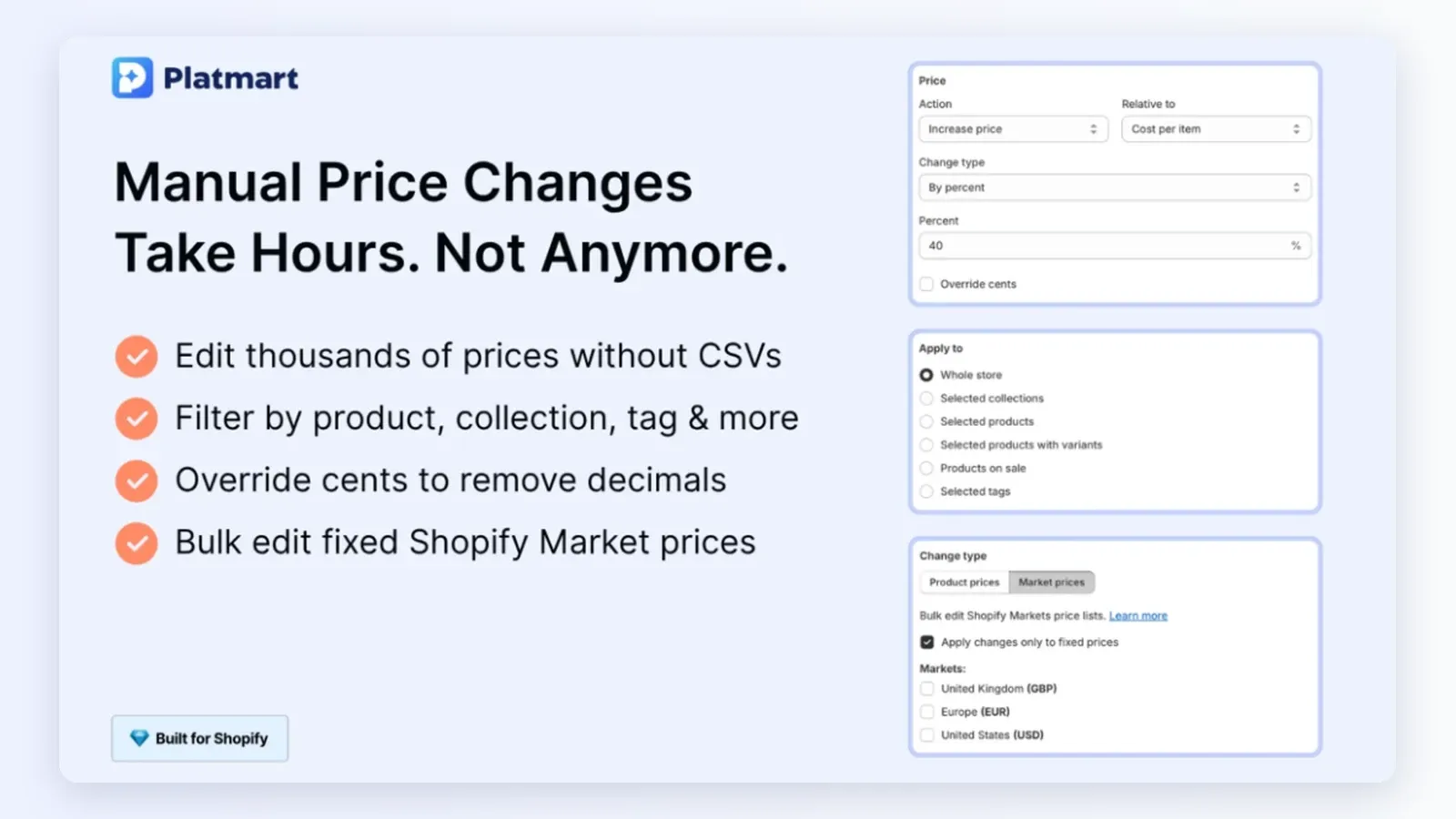
V3 platmart ui task markets

Platmart Bulk Price Editor task form with Market prices, from its Shopify App Store gallery, Nov 2026

Other apps: NA lists international relative and fixed pricing, with compare-at changes that also work on Markets; SA and Ablestar list market prices; Hextom covers region prices by filters or CSV; Bulk Price Editor Pro has Markets on its Super plan ($60/yr). NA is reviewed in NA bulk price editor, and spreadsheet routes in Matrixify alternatives.

Change prices for one country

To change prices for one country, edit that country’s market prices only; your main prices and other markets stay as they are.

This is the usual route for tariff-driven increases, covered step by step in the Shopify de minimis guide. Check app limits first: Platmart’s help center says state or province markets, such as Ontario, can’t be priced, and individual POS or B2B locations can’t be targeted. NA lists B2B and POS market prices on its Unlimited Pro plan ($49.95/mo, developer site only, as of Nov 2026). For store-wide changes, see how to change prices in bulk on Shopify.

Run a sale in one market

A market sale discounts one market for a set time and should restore its prices at the end.

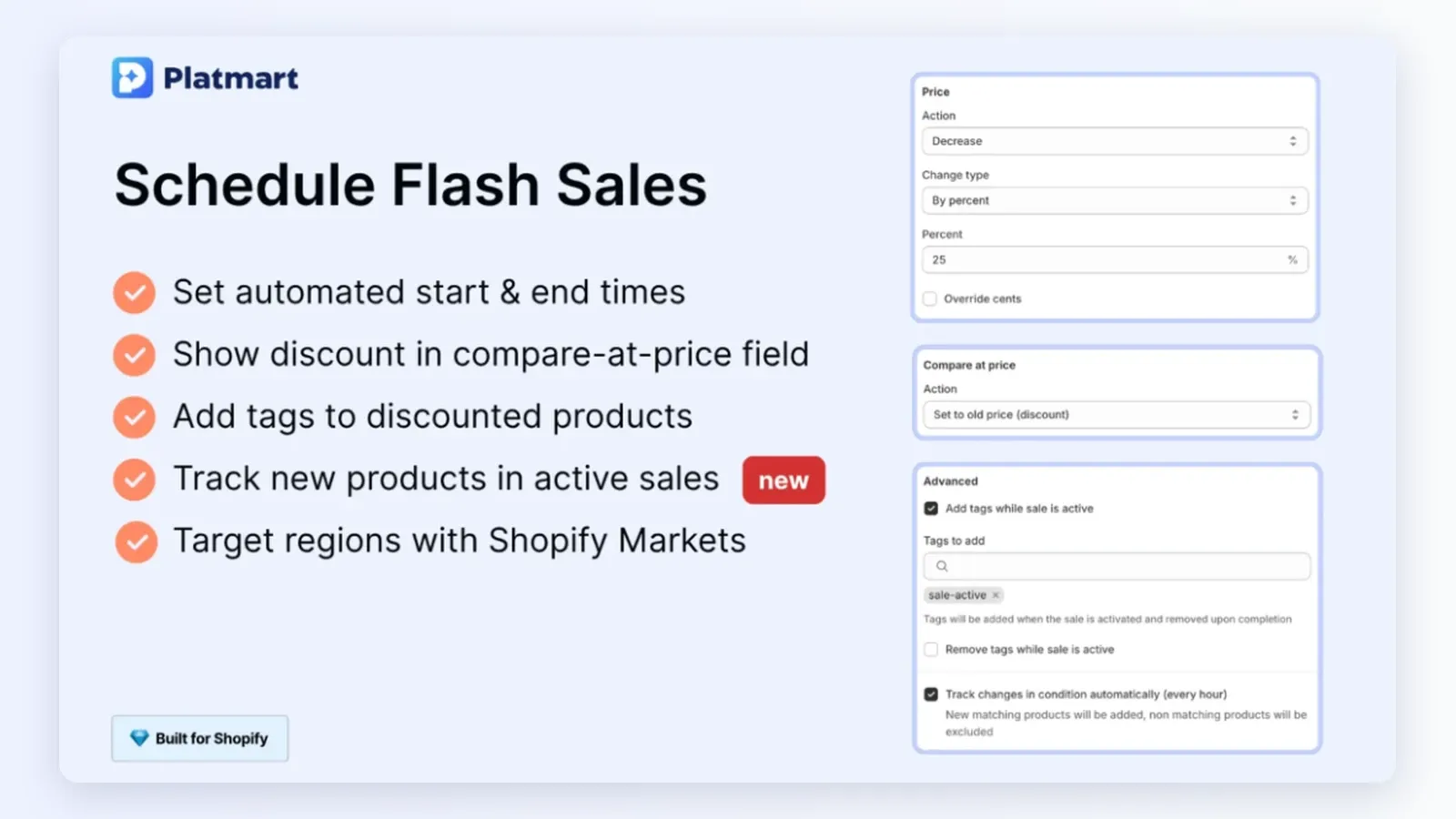
In Platmart, a sale under Market prices does this. Several markets fit in one sale only if they share a currency, so 10% off in the UK and Italy means two sales. “Block discount codes when the cart has items from this sale” works on market sales on every plan if set before the start. GetSale lists “Discount specific Markets” on its Unlimited plan ($29.99/mo). If shoppers abroad don’t see your main-price sale, their market probably has fixed prices; see products not discounted in Shopify sale.

V3 platmart ui schedule sale

Platmart Bulk Price Editor sale form, from its Shopify App Store gallery, Nov 2026

Tax-inclusive, multi-country markets

Some apps limit tax-inclusive stores to one market per run. In Platmart, if your store’s prices include tax, you edit one market at a time.

That answers “Why can’t I bulk edit markets with several countries when taxes are included?” Platmart’s help center notes that “Apply changes only to fixed prices” can unlock relative actions, such as a percent increase, on these limited markets. Run one task or sale per market.

Compare-at prices in markets

In Shopify’s catalog, compare-at follows the % adjustment unless you turn off Include compare-at price.

In apps, check how market compare-at is handled. In Platmart, a market’s compare-at changes only together with a price action, because of a Shopify API constraint, so “Set to old price (discount)” works in a market sale but compare-at can’t be edited alone. NA’s listing says its compare-at changes work on Markets. More in Shopify compare at price.

What happens when you change your main price

Converted prices move with your main price; fixed prices don’t.

So “If I change the main price, do other markets change?” depends on the market. Markets without fixed prices follow at once; markets with fixed prices keep theirs until you edit them. One trap: if you change a market’s currency, Shopify removes its fixed prices, so export them first.

B2B catalogs

B2B catalogs use the same idea: a percentage adjustment on your base price, or fixed prices that override it.

A 20% retail sale lowers base prices, so B2B prices that use only a percentage adjustment drop too; fixed catalog prices stay. Details in Shopify B2B catalog prices.

Which plan you need

Markets support sits on different plans in each app, as of Nov 2026:

  • Ablestar: market prices listed; paid plans from $30/mo.
  • Bulk Price Editor Pro: Super plan, $60/yr.
  • Hextom: region and B2B catalog prices listed; plan not stated.
  • NA Bulk Price Editor: Markets listed; B2B/POS market prices on Unlimited Pro, $49.95/mo.
  • Platmart: Advanced ($24.99/mo) and Premium ($39.99/mo), and Free within its limits. Stores that subscribed before Nov 3, 2026 keep legacy plans where Markets is Premium only.
  • SA Bulk Product Editor: market prices listed; paid plans from $9.90/mo.

Every app’s plans are compared on Shopify bulk price editor pricing.

Common mistakes

  • Raising main prices and expecting every market to follow. Fixed markets don’t; edit them separately.
  • One sale for two currencies. Some apps require one currency per sale.
  • Changing a market’s currency. Shopify drops its fixed prices. Export them first.
  • Editing compare-at alone in a market. Some apps need a price action alongside it.
  • Wrong percent on a whole market. Preview first, and keep an undo.

Tools that can do this

AppGood at for this jobEntry price (as of Nov 2026)Link
Hextom: Bulk Product EditRegion and B2B catalog prices by filters or CSVDemo free (10 products/task); Basic $9.99/moApp Store
MatrixifyPer-catalog price and compare-at columns in a spreadsheetDemo free (10 items/file); Basic $20 per 30 daysApp Store
NA Bulk Price EditorRelative and fixed international pricing; compare-at on MarketsFree (100 price changes/mo); Basic $9.95/moApp Store
Platmart Bulk Price EditorTop pick for market tasks and sales: fixed-price-only edits, reset, restore at sale endFree (within limits); Markets from $24.99/moTry free
SA Bulk Product Editor & PriceMarket prices with preview and undoFree (100 products/task); Basic $9.90/moApp Store

All price editors compared: Shopify bulk price editor.

FAQ

  • How do I set different prices per market on Shopify?

    Assign the market a catalog and either enter a percentage in its Price adjustment field or set fixed prices for individual products. Fixed prices override the adjustment. For many products, import fixed prices with the catalog CSV, or use a bulk price app’s market mode.

  • Is there a faster way to set prices per market?

    Yes. A bulk price app with Markets support changes market prices by rule instead of product by product: raise or lower a whole market by percent or amount, with rounding. NA, SA, Ablestar and Hextom list market prices.

  • If I change the main price, do other markets change?

    Only prices that aren’t fixed. Converted prices come from your main price, so they follow it at once. Fixed market prices keep their own numbers until you edit them, because they override admin prices and compare-at prices.

  • Does the compare-at price change in markets too?

    In Shopify’s catalog, compare-at follows the percentage adjustment by default; turn off “Include compare-at price” to set it yourself. In apps, it varies: NA lists compare-at changes on Markets, and some apps change market compare-at only together with a price.

  • Can one sale give 10% off in the UK and Italy?

    Check your app. The two markets use different currencies, and some apps allow several markets in one sale only if they share a currency. Then you create two market sales with the same dates.

  • Why can't I bulk edit markets with several countries when taxes are included?

    Some apps limit tax-inclusive stores to one market per run. Platmart, for example, edits one market at a time in that case, and its help center says “Apply changes only to fixed prices” can unlock relative actions such as a percent increase.

  • How do I change prices for just one country?

    Edit only that country’s market prices. In Shopify, set fixed prices in its catalog or by catalog CSV. In an app, switch to market prices, pick the market, set the change and run it. Main prices and other markets stay untouched.

  • What's the difference between fixed and converted prices?

    A converted price is your main price turned into the market’s currency at the exchange rate, with any rounding and percentage adjustment. A fixed price is a number you set per product or variant for that market. Fixed prices win over converted ones and don’t follow main-price changes.

  • What is a Shopify price list?

    Shopify’s help center now calls it a catalog: a set of products with optional custom pricing that you assign to a market. Many merchants and apps still say price list.

  • Can I use a CSV for market prices?

    Yes. The catalog CSV (Import > Adjust prices) sets Fixed Price and Compare At per product. The product CSV has “Price / [Market]” columns, but only for markets with exactly one active catalog not shared with another market. Matrixify adds per-catalog price columns.

  • How do I make a market follow the main price again?

    Remove its fixed prices: clear them in the catalog, or use an app’s reset action to do it in bulk for the products you pick. After that, the market’s prices are converted from your main price again, with its rounding and any percentage adjustment.

  • Which bulk price apps edit market prices, and on which plan?

    As of Nov 2026: Platmart on Advanced ($24.99/mo) and up, and Free within limits; Bulk Price Editor Pro on Super ($60/yr); NA, SA and Ablestar list market prices, with NA’s B2B/POS market prices on Unlimited Pro ($49.95/mo) (try Platmart free).

  • Will a market sale affect my B2B catalogs?

    A sale on one market’s prices changes only that market. A sale on main prices lowers base prices, so B2B prices that use only a percentage adjustment drop too, while fixed catalog prices stay. Give B2B fixed prices first if wholesale must stay put.

  • Can I raise prices for one market on a schedule?

    Yes, with an app that both schedules changes and edits market prices. Confirm in its docs that scheduling covers market prices. For a temporary change that reverts, use a market sale with start and end dates instead.

  • What happens to fixed prices if I change a market's currency?

    Shopify removes the market’s fixed prices when its currency changes. Export the catalog’s fixed prices to CSV before switching (the export includes fixed-price products), so you can re-import or rebuild them afterwards.

Top pick for price-only jobs: Platmart Bulk Price Editor · free planTry Free

Ask AI about this page

II

Ivan Ivanov

Shopify pricing writer

I compare Shopify pricing apps using their own App Store listings, docs and changelogs. Every price and limit on this site carries the date it was checked.

Popup manager v2

Changing thousands of Shopify prices?

Our top pick for price-only jobs is Platmart Bulk Price Editor: scheduled sales that restore prices, compare-at strikethrough and rollback.

Free plan · paid from $14.99/mo (Nov 2026).

See all apps compared