
Logo bulkpriceeditors

How to Put Items on Sale on Shopify (2026 Guide)

How to put items on sale on Shopify: one product, a whole collection or sitewide, with the old price crossed out and an automatic end. Updated Nov 2026.

Updated November 27, 2026 · by Ivan Ivanov

Some links on this page are affiliate links. Facts come from Shopify’s help pages and each app’s own docs.

Quick answer

To put an item on sale on Shopify, lower its Price and enter the original price as its Compare-at price. Themes cross out the old price only when compare-at is higher, and Shopify won’t end the sale for you.

  • One product: 2 fields on the product page.
  • A collection or the whole store: Shopify’s bulk editor or a CSV, then the same edit again to end it.
  • Shopify’s sale-pricing help page mentions no scheduling or automatic end.
  • Sale apps add percent off, start/end times and automatic restore.

Top pick for price-only jobs: Platmart Bulk Price Editor (scheduled sales that restore prices, compare-at, Markets, rollback; free plan, paid from $14.99/mo).

See the free plan →

For a discount code or buy-X-get-Y offer: Shopify’s built-in Discounts are enough.

The built-in Shopify way, in short

Shopify’s built-in sale is two numbers per variant: a lower Price and a higher Compare-at price that the theme shows crossed out.

One product.

  1. In your Shopify admin, go to Products and open the product.
  2. In the pricing section, enter the original price in Compare-at price and the sale price in Price. Repeat on each variant that should be discounted.
  3. Click Save. To end the sale, put the old price back and clear compare-at (empty, not 0.00).

A collection or the whole store. Select the products in the product list and open the shopify bulk editor. Show Price and Compare-at price from the Columns menu, edit the cells and click Save. For big catalogs, export a product CSV, change the price and compare-at columns, and import with the overwrite option. Shopify’s help pages mention no percent formulas, scheduling or undo for either route.

Sources: Shopify sale pricing, bulk editing, CSV import.

The faster way: a bulk price app

With a sale app, a Shopify sale is one form: pick the products, the discount and the dates, and the app records the current prices and puts them back when the sale ends. The steps are similar across apps:

  1. Create a sale and give it an internal name.
  2. Set the discount: percent or amount off.
  3. Set compare-at to the old price so the theme crosses it out.
  4. Choose the products: collection, tags, variants or the whole store, minus exclusions.
  5. Set the start and end date and time.
  6. Preview, then start. Prices restore at the end time.

In Platmart Bulk Price Editor, for example, 20% off a collection for a weekend looks like this, per its docs and help center:
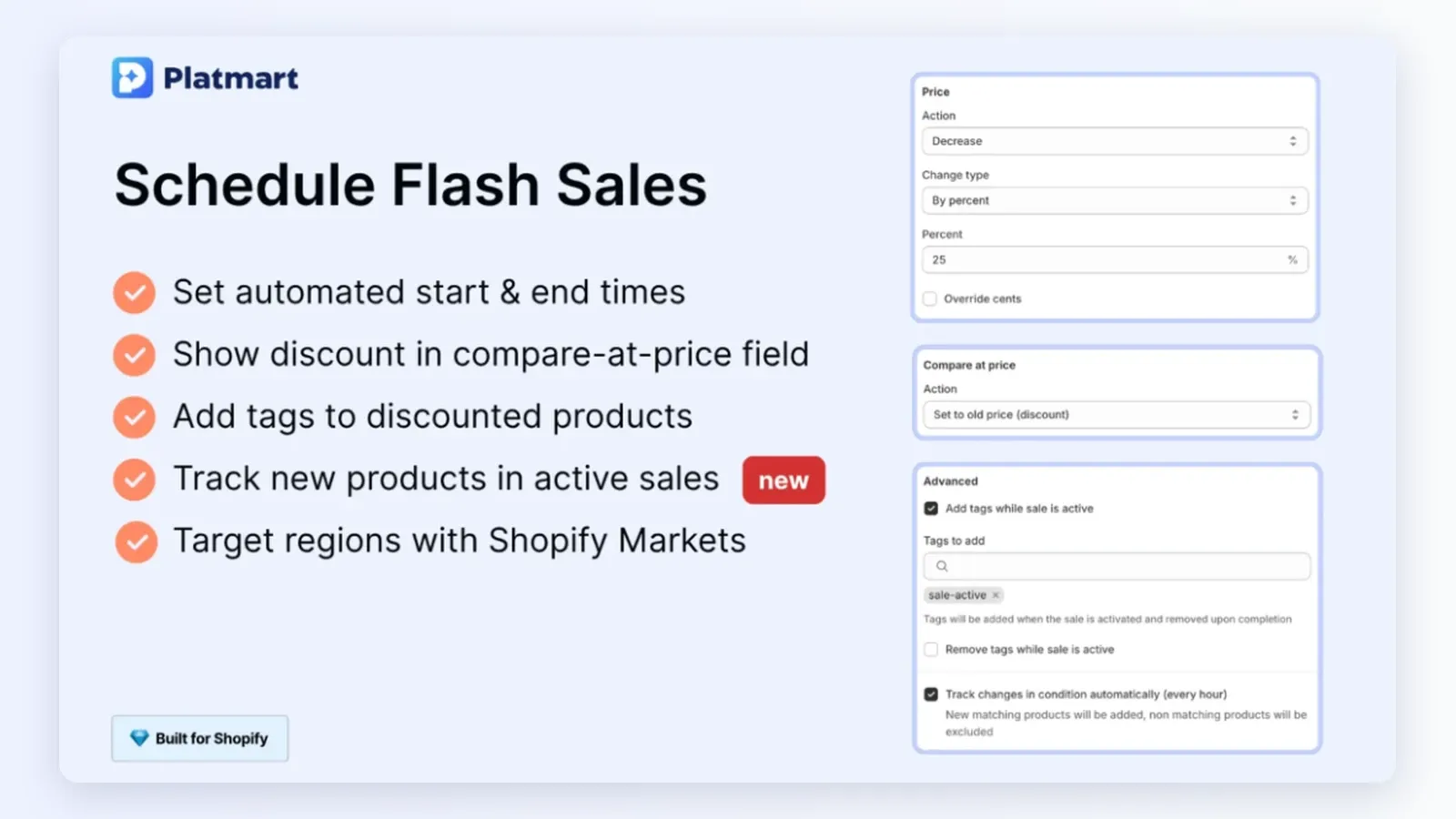
V3 platmart ui schedule sale

Platmart Bulk Price Editor sale form, from its Shopify App Store gallery, Nov 2026

  1. Go to Sales > Create sale and enter a Title (customers never see it).
  2. Keep Price rules and Product prices.
  3. Under Price, choose Decrease, by percent, 20. For items that already have a compare-at price, set Relative to to Compare at price.
  4. Under Compare at price, choose Set to old price (discount).
  5. Under Apply to, pick the collection, tags or Whole store. Review Exclude (gift cards are excluded by default).
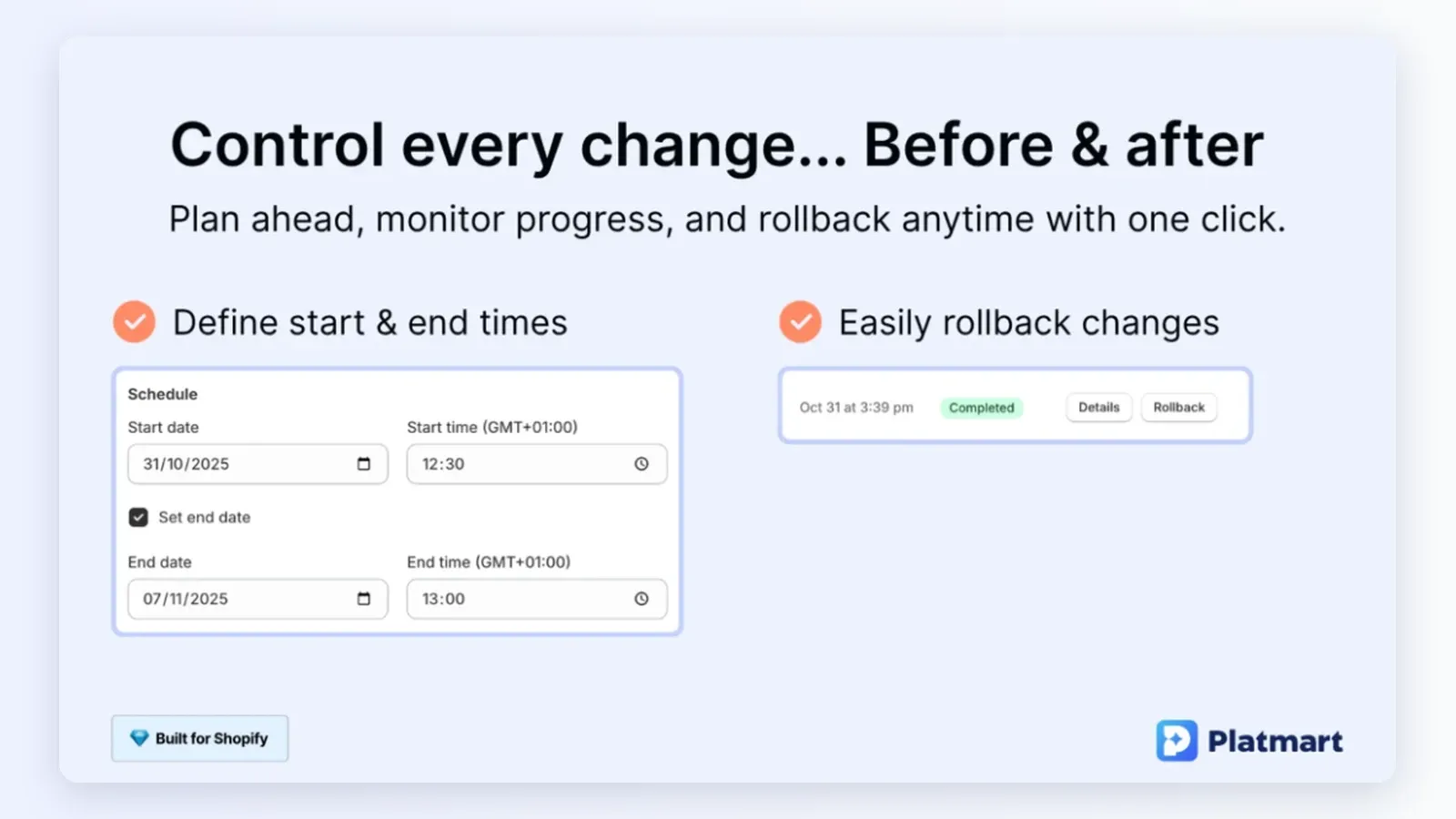
  6. Under Schedule, set the start, turn on Set end date and set the end, in your store timezone.
  7. Click Preview changes, then Start sale or Schedule sale. Prices restore at the end time, or when you click Disable.

Scheduled sales start on its Basic plan ($14.99/mo, 25,000 products per sale); Free covers 2 sales a month up to 100 products each (as of Nov 2026).

Other apps that do the same: GetSale and SA Bulk Product Editor (Basic+) state sales that set compare-at and revert automatically, Ablestar and Hextom (Professional+) schedule sales that auto-revert, and NA Bulk Price Editor schedules and reverts price jobs. They’re compared in shopify sale app and the shopify bulk price editor roundup, with every plan on shopify bulk price editor pricing.

Make a Shopify sale end automatically

Shopify’s sale-pricing help page mentions no way to schedule a sale price or end it on a date.

Discounts in Shopify’s Discounts section can have start and end dates, but they act in the cart and checkout, not on the shelf price. For real sale prices with strikethroughs that start Friday at 12:00 am and revert Monday, you either make the edits yourself at those hours or use an app with an end time. Check the details: in Platmart the end must be at least 10 minutes after the start and recurring schedules aren’t supported, while GetSale (Unlimited) and SA (Basic+) state repeating schedules. Full walkthrough: shopify schedule sale.

V3 platmart ui schedule rollback

Platmart Bulk Price Editor schedule and rollback, from its Shopify App Store gallery, Nov 2026

Sale price vs discount code vs automatic discount

A sale price changes the product’s price itself, while discount codes and automatic discounts take money off later, in the cart or at checkout.

  • Sale price (compare-at): shows wherever the price shows, with a strikethrough if your theme supports it. Best for public promotions shoppers should see while browsing.
  • Discount code: typed at checkout. Good for email lists, influencers and one-off offers. The product page price never changes.
  • Automatic discount, including a Shopify collection discount: applied without a code once the cart qualifies. Good for buy-X-get-Y and spend thresholds.

Codes can stack on sale prices. Some sale apps (NA, GetSale on Unlimited, Platmart) can refuse codes on any cart with a sale item, using an app automatic discount that counts toward Shopify’s limit of 25. More in shopify automatic discount and, for the display side, shopify compare at price.

Common mistakes and how to avoid them

Most failed sales trace back to a few causes, drawn from merchant support questions.

  • The old price isn’t crossed out. Compare-at is empty, equal or lower than price. Set compare-at to the pre-sale price; most sale apps have an option that copies it for you.
  • Compare-at saved as 0.00. Shopify treats it differently from an empty field. Clear the field instead.
  • Forgetting to end the sale. Set an end time in the app, or put a reminder in your calendar if you edit by hand.
  • Discounting items that were already on sale. Exclude products whose compare-at is already above price. In Platmart this is the “Products on sale” exclusion.
  • Wrong percent on a big catalog. Use the app’s preview before you start, or test on one collection first.
  • Some products missing from the sale. Common causes: the product is already in another active sale, it’s a draft, it’s excluded, or it was added after the start. See why products aren’t discounted in a Shopify sale.
  • Another app resets your sale prices. Check for repricing or sync apps that write prices on a schedule.
  • Editing prices by hand mid-sale. An end-of-sale restore can overwrite them. Make permanent changes after the sale (see how to change prices in bulk on Shopify).
  • Uninstalling during a sale. End or disable the sale first and confirm prices are back.

For different sale prices per variant from a file, see shopify bulk edit variants.

Tools that can do this

AppGood at for this jobEntry price (as of Nov 2026)Link
Ablestar Bulk Product EditorScheduled sales that auto-revert, plus all product fieldsFree Starter; $30/moApp Store
GetSale Bulk Discounts & SalesSales that revert, plus timers and bannersFree; $9.99/moApp Store
NA Bulk Price EditorScheduled price jobs with revert and code blockingFree; $9.95/moApp Store
Platmart Bulk Price EditorScheduled sales that restore, compare-at, previewFree; $14.99/moSee plans
SA Bulk Product Editor & PriceSales that revert, recurring schedulesFree; $9.90/moApp Store

FAQ

  • How do I put an item on sale on Shopify?

    Open the product in your Shopify admin, enter the original price in Compare-at price and the lower sale price in Price, then save. Your theme shows the old price crossed out as long as compare-at is higher than price. For products with variants, set both fields on every variant you want discounted.

  • How do I put a whole collection on sale in Shopify?

    Select the collection’s products and edit Price and Compare-at price in Shopify’s bulk editor, or in a product CSV. With a sale app, you create one sale, choose the collection, set the percent and copy the old price into compare-at in the same step, then the app restores prices at the end.

  • Can I put my entire Shopify store on sale at once?

    Yes, but Shopify’s built-in tools make you edit every price, then edit them back. A bulk price app applies one percent to the whole store in a single sale. Check the plan’s cap against your catalog: limits are counted per product, per variant or per monthly price change, depending on the app.

  • Why isn't my sale price showing as crossed out?

    The compare-at price is probably empty, equal to the price or lower. Themes cross out the old price only when compare-at is higher than price. Also check you didn’t enter 0.00, which isn’t the same as an empty field, and that every variant has its own compare-at price.

  • Can I schedule a sale on Shopify to start and end automatically?

    Not for sale prices with Shopify’s built-in tools: the sale-pricing help page mentions no scheduling. Discounts can have dates, but they don’t change the product price. Sale apps such as GetSale, SA (Basic+) and Ablestar state scheduled sales that revert. Steps: shopify schedule sale.

  • Do prices go back to normal after a sale ends?

    Only if a tool puts them back. With Shopify’s built-in editing, you restore each price and clear compare-at yourself. Apps that state an automatic restore record the prices before the sale and write them back at the end. Manual edits made during the sale can be overwritten by that restore.

  • What's the difference between a sale price and a discount code?

    A sale price lowers the product’s actual price, so customers see it on product and collection pages, usually with the old price crossed out. A discount code takes money off at checkout, only after the customer enters it. Sale prices suit public promotions; codes suit targeted offers.

  • Should I use an automatic discount or a sale price?

    Use a sale price when shoppers should see the lower price and strikethrough while browsing. Use an automatic discount for cart-based offers such as buy one, get one or spend $100, save $20. Automatic discounts apply in the cart and checkout, so the product page keeps the regular price.

  • Can customers use discount codes on top of sale prices?

    Yes, unless you stop it. Shopify combines discounts according to each discount’s settings, and a code still applies to a product whose price you lowered. NA Bulk Price Editor and GetSale (Unlimited) can block codes on carts with sale items; check that the block is on before the sale starts.

  • How do I show a "Sale" badge on products?

    Sale and percent-off badges come from your theme, not a Shopify product field, and they key off a compare-at price that’s higher than the price. Check your theme settings for a badge option. To group sale items, tag them and build an automated collection on that tag.

  • Why didn't some products in my collection get the discount?

    Usually the product is in another active sale, it’s a draft, it was excluded as sold out or already on sale, or it was added after the sale started. Recheck the sale’s conditions and exclusions in your app. The full checklist is in why products aren’t discounted in a Shopify sale.

  • Do new products join a running sale?

    Not by default in most apps. In Platmart, Premium’s “Track changes in condition automatically (every hour)” adds new matching products to a running sale and removes ones that stop matching; on other plans, Actions > “Check changes” rechecks by hand. Other apps don’t state this feature.

  • Can I run a sale on a free plan?

    Shopify’s own tools are free but manual. Several apps have free plans with limits, as of Nov 2026: Platmart Free includes 2 sales a month up to 100 products each, GetSale’s free plan covers 75 variants and 3 campaigns with start/end dates, and SA’s free plan covers 100 products per task without scheduling.

  • Can I change a sale after it starts?

    It depends on the app. In Platmart, the newest help articles say you can edit an active sale’s title, products, exclusions and end date, while the discount, rounding, start time, markets and tags are locked. To change the discount, disable the sale (prices restore), duplicate it and start the copy.

  • What happens if I uninstall the sale app during a sale?

    Check the app’s docs first. A sale app writes prices to your products, so if it’s removed before the sale ends, the sale prices can stay in your store. End or disable running sales, confirm prices are back, then uninstall. Some apps keep your data for a while in case you reinstall.

Top pick for price-only jobs: Platmart Bulk Price Editor · free planTry Free

Ask AI about this page

II

Ivan Ivanov

Shopify pricing writer

I compare Shopify pricing apps using their own App Store listings, docs and changelogs. Every price and limit on this site carries the date it was checked.

Popup manager v2

Changing thousands of Shopify prices?

Our top pick for price-only jobs is Platmart Bulk Price Editor: scheduled sales that restore prices, compare-at strikethrough and rollback.

Free plan · paid from $14.99/mo (Nov 2026).

See all apps compared