Logo bulkpriceeditors

Shopify De Minimis: How to Raise Prices for US Customers Only (2026)

Shopify de minimis guide: what ended for low-value US shipments and how to raise prices for your US market only, by percent, rounded to .99, with rollback.

Updated November 27, 2026 · by Ivan Ivanov

Some links on this page are affiliate links. App facts are checked against each vendor’s own listing and docs.

Quick answer

The US no longer lets low-value parcels in duty-free under de minimis, so stores shipping to US buyers from abroad often raise prices for the US market only. In Shopify, change your US market’s prices by a percent, round to .99, preview, and keep a way to undo it.

  • De minimis covered shipments valued at $800 or less; its suspension for all countries took effect Aug 29, 2025 (CBP).
  • CBP rules announced Jun 24, 2026 make the suspension indefinite, for postal and other shipments.
  • Shopify’s catalog price adjustment raises a market by one percent; fixed prices override it.
  • Bulk price apps add rounding, preview, scheduling and rollback on market prices.

Top pick for a US-only price change: Platmart Bulk Price Editor (Market prices tasks with .99 rounding, preview, schedule and rollback; free plan, paid from $14.99/mo, Markets from $24.99/mo, as of Nov 2026).

See Platmart Bulk Price Editor →

If you only need one flat percent on a US market with no fixed prices, Shopify’s own catalog price adjustment is enough; if you also edit other fields, Hextom covers market prices too.

What changed with US de minimis

De minimis let shipments valued at $800 or less enter the US without duties; that treatment is now suspended for goods from every country.

Per US Customs and Border Protection (CBP):

  • The order suspending duty-free de minimis treatment for all countries took effect August 29, 2025 (CBP release, Jun 24, 2026).
  • CBP’s new rules make the suspension indefinite and cover merchandise valued at $800 or less from all countries, by mail or any other mode (CBP e-commerce FAQ, last modified Nov 6, 2026).
  • Bona fide gifts and certain personal or household articles that travel with a passenger keep their own exemptions.

This isn’t legal or customs advice. Who pays the duties, and how they’re collected, depends on how you ship; ask your carrier or customs broker. The rest of this guide covers the pricing side in Shopify.

Should you raise prices for US customers only?

Raising only the US market keeps your other markets’ prices as they are, which is why stores selling into the US from elsewhere reach for it.

Whether and how much to raise is a business call. What matters for the mechanics:

  • Your US market needs its own prices. If it has no fixed prices, its prices follow your main price, so any main-price change hits every market.
  • Store-wide cost increases are a different job. A US-based store paying more for imported stock usually raises prices everywhere; see how to raise prices on Shopify or shopify markup.

Background on fixed and converted prices: Shopify markets pricing.

The built-in Shopify way

Shopify can raise one market’s prices with a catalog price adjustment, a single percentage applied to every price in that market’s catalog.

Per Shopify’s catalogs help page:

  1. Open the US market’s catalog and enter a percentage in Price adjustment. Compare-at prices follow by default.
  2. Fixed prices in that catalog override the adjustment, so edit them separately, by hand or through the catalog CSV (Fixed Price and Compare At columns).
  3. Use the market’s rounding rules to tidy the converted prices.

That works for one flat percent. Shopify’s pages mention no preview of the new prices, no scheduled start, and no rollback beyond typing the old percent back or re-importing an old CSV.

The faster way: a bulk price app

A bulk price app with market support raises one market’s prices by rule, rounds them, and keeps a log you can roll back.

The generic flow: pick market prices instead of main prices, select the US market, set a percent increase, add rounding, choose products, preview, then run now or on a date. In Platmart Bulk Price Editor, for example, an 8% US increase looks like this per its markets docs:

  1. Click Create task and, under Change type, choose Market prices.
  2. Select your US market only (for example, United States).
  3. Under Price, choose Increase price, by percent, 8.
  4. Add rounding: Set price ending with *.99, or Override cents 99.
  5. Under Apply to, choose Whole store, or the collections or tags you ship to the US.
  6. Optional: tick Apply changes only to fixed prices to change only variants that already have US fixed prices.
  7. Click Preview changes, then Start task, or choose Schedule for later.
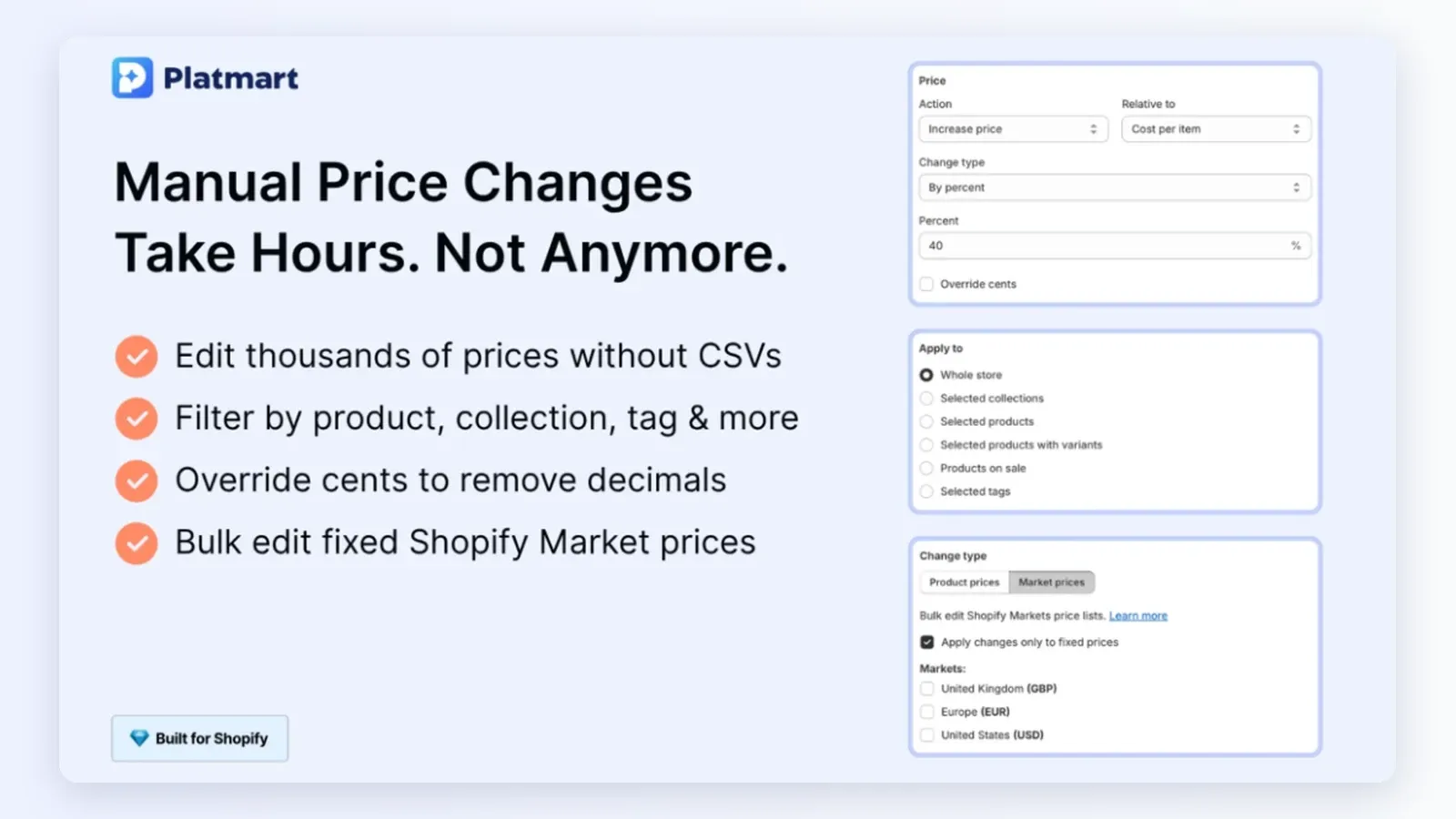
V3 platmart ui task markets

Platmart Bulk Price Editor task form with Market prices, from its Shopify App Store gallery, Nov 2026

Platmart’s Market prices are on Advanced ($24.99/mo) and Premium ($39.99/mo), and on Free within 1 task and 100 products a month; stores on plans from before Nov 3, 2026 need Premium. One merchant, an Italian store, wrote in a Sept 23, 2026 App Store review that it uses the app to raise US prices after de minimis ended; that’s one review, not a measured result.

Other apps list market price editing too: NA Bulk Price Editor (from its free plan), SA Bulk Product Editor & Price, Hextom Bulk Product Edit and Ablestar, and Bulk Price Editor Pro on its Super plan ($60/year). Matrixify edits per-catalog price columns in a spreadsheet. Prices as of Nov 2026; plans side by side in Shopify bulk price editor pricing.

Round the new US prices to .99

A percent increase leaves odd cents, so add rounding in the same step.

Shopify’s market rounding rules apply to converted prices. In apps, rounding sits in the same task: Platmart’s modes are “No rounding”, “Round to whole number”, “Override cents” (00 to 99) and “Set price ending” (a pattern like *.99). So 8% on $27.00 gives $29.16, and “Override cents” at 99 makes it $29.99. Hextom, Ablestar, SA and Bulk Price Editor Pro also list rounding; NA doesn’t state it. More in Shopify round prices.

Preview, schedule and roll back

Preview before, rollback after: that pair makes a market-wide increase safe.

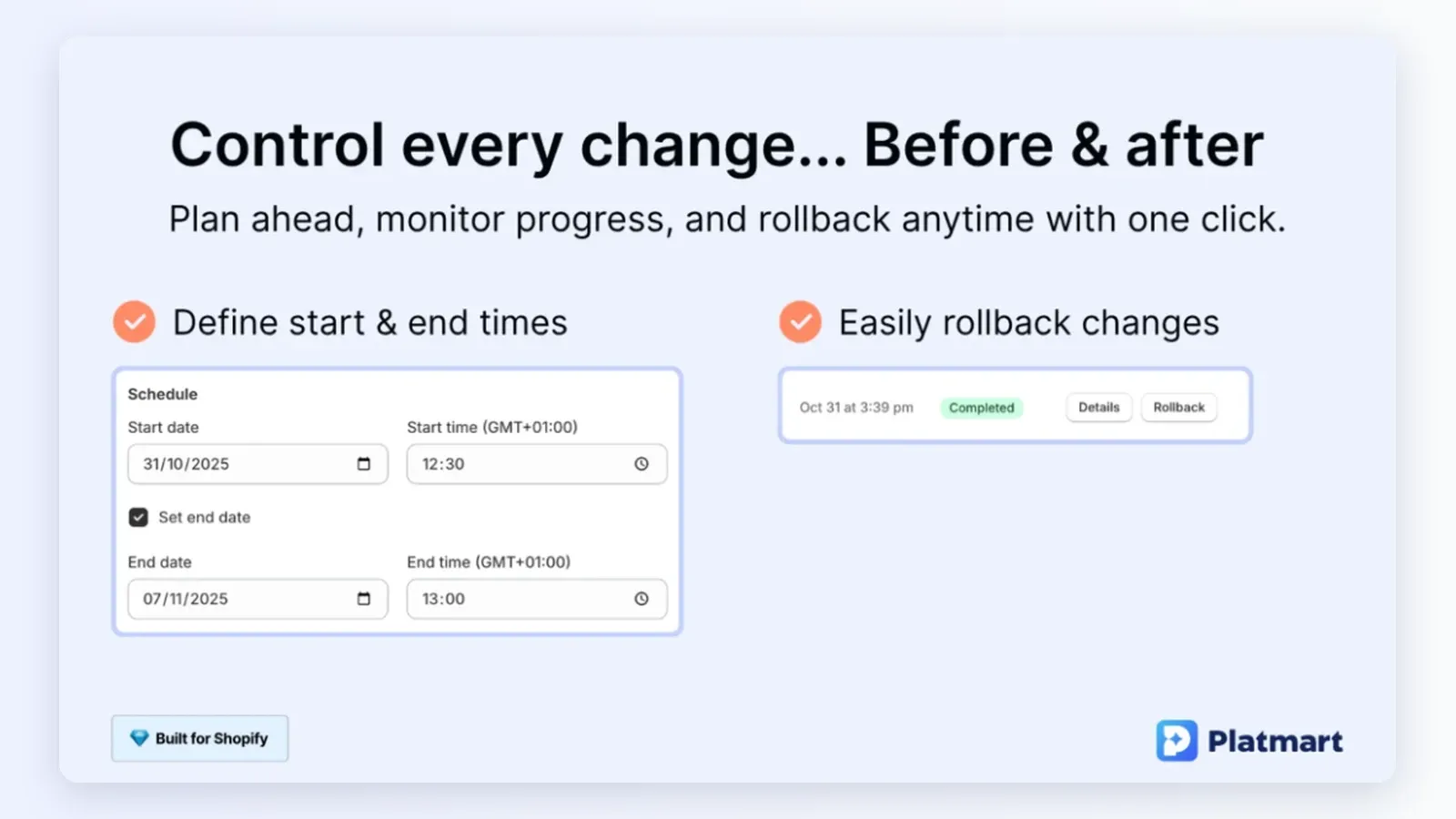
Apps differ here. Platmart’s Preview changes shows current against new prices for 30 minutes; Schedule for later runs the task at a set time (Advanced and up, and Free); Rollback works on any completed task while the app is installed, and for 90 days after uninstalling if you reinstall. SA and Ablestar preview old against new values and undo in one click within their history windows; Hextom reverts within its 30 to 180-day backup window. Details in undo bulk edit shopify.

V3 platmart ui schedule rollback

Platmart Bulk Price Editor schedule and rollback, from its Shopify App Store gallery, Nov 2026

Compare-at prices in the US market

A price increase shouldn’t look like a sale, so leave compare-at alone unless the new price passes it.

If a US compare-at price ends up lower than the new price, themes stop showing the strikethrough. Shopify’s catalog adjustment moves compare-at with the price by default. In Platmart, a market’s compare-at changes only together with a price action (a Shopify API constraint), so add Increase compare at price by the same percent in the same task.

Common mistakes

  • Raising main prices instead of the US market. Every market without fixed prices follows.
  • Forgetting fixed prices under a catalog adjustment. They override it, so edit them by CSV or with an app that targets fixed prices.
  • Skipping rounding. A percent leaves cents like $29.16.
  • Losing the strikethrough on items already on sale. Raise compare-at with the price.
  • Changing the US market’s currency. Shopify removes its fixed prices, and apps don’t bring them back.

Tools that can do this

AppGood at for this jobEntry price (as of Nov 2026)Link
Hextom: Bulk Product EditMarket and B2B catalog prices, rounding to .99, revert from Task HistoryFree demo (10 products/task); Basic $9.99/moApp Store
NA Bulk Price EditorRelative and fixed international prices, compare-at on Markets, revertFree (100 price changes/mo); Basic $9.95/moApp Store
Platmart Bulk Price EditorMarket prices tasks with .99 rounding, preview, schedule, rollbackFree (100 products); Markets from Advanced $24.99/moSee the app
SA Bulk Product Editor & PriceMarket prices, rounding, preview and one-click undoFree (100 products/task); Basic $9.90/moApp Store

Hextom in depth: hextom bulk product edit. All apps: Shopify bulk price editor.

FAQ

  • What is de minimis and does it affect my Shopify store?

    De minimis let shipments valued at $800 or less enter the US duty-free. CBP says that treatment is suspended for goods from all countries, effective August 29, 2025, and now indefinitely. If you ship orders from outside the US to US buyers, those parcels can owe duties. Ask your carrier or broker how that works for you.

  • How do I raise prices for US customers only on Shopify?

    Change your US market’s prices, not your main prices. Shopify’s catalog price adjustment raises the whole market by one percent, while fixed prices need separate edits. Bulk price apps with Markets support raise the US market by percent with rounding, preview and undo.

  • Will raising US market prices change my prices in other countries?

    No. A US market price change affects only the US market. Main prices and other markets stay as they are. The opposite isn’t true: if you raise your main prices instead, every market without fixed prices follows, including markets you didn’t mean to change.

  • Can I round the new US prices to .99?

    Yes. Shopify has rounding rules per market for converted prices. Apps such as Hextom, SA and Ablestar list rounding to endings like .99, and you can check the result in a preview before it runs. Do it in the same step as the increase.

  • Can I undo a US price increase?

    With Shopify’s catalog adjustment, change the percent back; for fixed prices, re-import your old CSV. In apps, undo depends on the history window: Platmart’s Rollback works months later while installed, while SA, Ablestar and Hextom keep 30 to 180 days by plan.

  • Should I show the old price crossed out after a tariff increase?

    Usually not, since it’s a price rise, not a sale; leave compare-at unchanged. The catch: if a product already has a US compare-at price and the new price passes it, the strikethrough disappears. Raise compare-at by the same percent in the same step.

  • Which app plan do I need for US market prices?

    It varies. NA lists Markets from its free plan, and Bulk Price Editor Pro only on Super ($60/year). Platmart has Market prices on Advanced ($24.99/mo) and Premium, or Free within 100 products; legacy plans from before Nov 3, 2026 need Premium. Prices as of Nov 2026.

  • Can I schedule the US price increase for a specific date?

    Yes, with an app. Several apps list scheduled permanent changes, including NA, Hextom (Professional and up), SA (Basic and up) and Ablestar. Shopify’s catalog pages mention no scheduled price adjustment, so a built-in change runs when you save it.

Top pick for price-only jobs: Platmart Bulk Price Editor · free planTry Free

Ask AI about this page

II

Ivan Ivanov

Shopify pricing writer

I compare Shopify pricing apps using their own App Store listings, docs and changelogs. Every price and limit on this site carries the date it was checked.

Popup manager v2

Changing thousands of Shopify prices?

Our top pick for price-only jobs is Platmart Bulk Price Editor: scheduled sales that restore prices, compare-at strikethrough and rollback.

Free plan · paid from $14.99/mo (Nov 2026).

See all apps compared