Updated November 27, 2026 · by Ivan Ivanov
Some links on this page are affiliate links. Facts are checked against each app’s own listing and docs.
Quick answer
Products miss a Shopify sale for two kinds of reasons. On Shopify’s side: the product’s price was never lowered, compare-at isn’t higher than price, the “sale” is a discount that applies only in the cart, or the market has fixed prices. In a bulk sale app: the product was added after the start, sits in another sale, was excluded, is a draft, or another app reset its price.
- Shopify shows a sale only when compare-at is higher than price.
- Fixed market prices override admin prices and compare-at prices.
- Platmart’s support logged 22 merchant questions on this between March and November 2026.
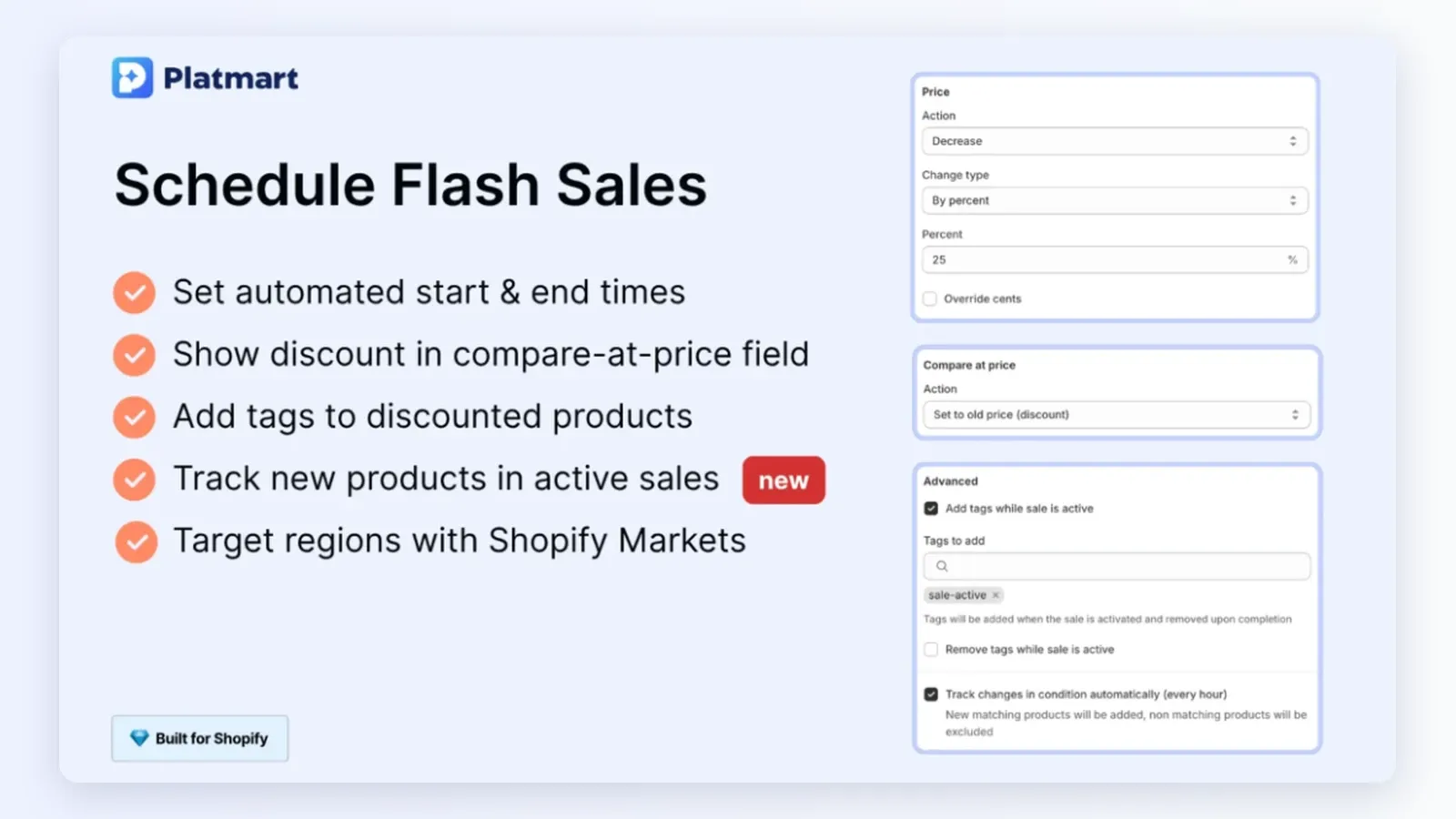
If new products must join a running sale on their own: of the apps compared here, only Platmart states it (hourly tracking, Premium $39.99/mo as of Nov 2026); the other listings don’t say.
Causes on Shopify’s side (check these first)
Before blaming an app, rule out the five Shopify-level causes. They apply whether you ran the sale by hand or with an app.
- The price was never lowered. With Shopify’s own tools, a product is on sale only if you lowered its Price and set a higher Compare-at price yourself. Shopify’s sale-pricing help mentions no sale rules, so products you didn’t edit, or add later, stay at full price. Basics: Shopify sale.
- Compare-at is empty or not higher than price. The theme then shows no crossed-out price, so the product looks undiscounted. To remove a compare-at, clear the field: 0.00 is not the same as empty. See Shopify compare at price.
- It’s a discount, not a sale price. Automatic discounts and codes apply in the cart and at checkout; product pages keep full prices. Shopify allows up to 25 active automatic discounts, discounts combine only if their settings allow, and combinations don’t work on external checkouts such as Facebook, Instagram or Google. More in Shopify automatic discount.
- The shopper’s market has fixed prices. Per Shopify, fixed market prices override admin prices and compare-at prices, so a sale on your main prices doesn’t reach them. Fix: discount that market’s prices too. See Shopify markets pricing.
- The buyer is on a B2B catalog with fixed prices. Fixed catalog prices override adjustments, so a retail sale doesn’t change them. See Shopify B2B catalog prices.
Symptom → cause → fix: the full checklist
Find your symptom; most “missing” products come down to one of these. App fixes use Platmart’s option names from its docs and help center as the worked example, checked Nov 27, 2026.
| Symptom | Likely cause | Fix |
|---|---|---|
| Price dropped but nothing is crossed out | Compare-at empty or not higher than price | Set compare-at to the old price (Platmart: "Set to old price (discount)") |
| Product pages show full price, cart shows discount | A discount, not a sale price | Change product prices if you want it on product pages |
| Shoppers in another country see no discount | That market has fixed prices | Run the sale on that market's prices too |
| Products added after the start aren't discounted | The sale matched products when it started | Edit the sale or recheck it (Platmart: Actions > "Check changes") |
| Some products in the collection kept full price | They're in another active sale | Exclude them from the first sale, then recheck both |
| Items with an existing compare-at were skipped | An "already on sale" exclusion | Remove it, or discount off the full price |
| Some sizes or colors weren't discounted | Variant-level exclusion, sold-out exclusion, or only some variants picked | Check exclusions and the product selection |
| Drafts you just set to active aren't in the sale | Drafts skipped, then activated after the start | Recheck; include drafts in the app's settings |
| Products with a tag you just added are missing | The app hasn't loaded the new tag | Reload tags, reselect, recheck |
| Sale prices went back to full price mid-sale | Another app, a sync or a manual edit reset them | Find the source; Platmart Premium re-applies hourly |
| Unpublished products got discounted | Selection by product status, not sales channel | Exclude them by product, collection or tag |
What this means: most gaps are not bugs. The sale did what its settings said, so the fix is a setting or a recheck, not a new sale.
Why products are skipped in a bulk sale app (examples from Platmart)
Sale apps differ in how they match products, so read your app’s docs on each point below. The examples are Platmart’s documented behavior, because its docs and support answers cover these cases in detail.